Market ·
How to See Which Ads Your Competitors Are Running
Search a rival in the Meta Ad Library, Google Ads Transparency Center and LinkedIn Ad Library: what each one shows, and what their pages leave out.
By Digvijay Yadav, Founder, Baljia AI · LinkedIn
Baljia is an AI employee for founders and small businesses. It gets you found and books meetings. Try it on one real goal: a 7-day free trial, no credit card.
Start freeThe short answer
To see a competitor's ads, search their name in three ad libraries. The Meta Ad Library covers Facebook and Instagram. The Google Ads Transparency Center covers Search and YouTube. The LinkedIn Ad Library covers business buyers. Each shows the ads and when they ran. None of their help pages mentions whether an ad made money. Only Meta mentions spend figures, and only for political and issue ads. This guide is for owners checking a few rivals themselves.
Baljia is my company, and its competitor research covers rivals' Meta ads, so it has one short section near the end. We read each platform's help pages on November 14, 2026. We did not log in or search the libraries. The Meta and Google library pages would not load for our reader, so their steps follow the help articles. Where a page is silent, we write "not stated".
Key takeaways
- The Meta Ad Library shows ads currently running on Facebook, Instagram, Messenger and Audience Network, each with the date it first appeared. Ordinary ads leave search when they stop, unless they reached people in the EU (kept one year) or are about social issues, elections or politics (kept seven years).
- The Google Ads Transparency Center finds an advertiser by name or website and lists its ads on Search, Display, Gmail and YouTube. The Google help pages we read do not mention spend or results, or how long ads stay listed.
- The LinkedIn Ad Library works with or without a LinkedIn account and keeps each ad for one year after its last impression. Targeting and impressions appear only for ads aimed at the EU and Brazil.
- No page from the three libraries mentions clicks, leads or sales, so a long-running ad is a clue to test, not proof that it pays. Write down each ad's run length, offer, first line and format, because ordinary Meta ads shown outside the EU vanish from search once they stop.
- Baljia, which we make, shows your competitors' longest-running Meta ads; its site names Meta only, not LinkedIn, Google or TikTok ads. Its 7-day free trial, no credit card is a way to try Baljia on one real goal.
How do you decide which ad library to open first?
Decide by where your buyers spend their time. Answer these questions in order:
- Do your buyers scroll Facebook or Instagram? Open the Meta Ad Library first. One search covers Facebook, Instagram, Messenger and Audience Network, and every ad carries the date it first appeared.
- Do your buyers search Google or watch YouTube before they buy? Open the Google Ads Transparency Center next. One search covers Search, Display, Gmail and YouTube.
- Do you sell to other businesses? Open the LinkedIn Ad Library first. It needs no account and keeps about a year of history.
- Do you sell in the EU or Brazil? Expect more detail on ads shown there, including targeting: LinkedIn for the EU and Brazil, and Meta for the EU, per its 2023 announcement.
If you are unsure, start with Meta, then Google, then LinkedIn. TikTok also runs an ad library. None of its pages would open for us on November 14, 2026, so this guide leaves it out.
| Library | Where to find it | Account needed? | What it covers | Spend shown? | How long ads stay |
|---|---|---|---|---|---|
| Meta Ad Library | facebook.com/ads/library | Not stated | Active ads on Facebook, Instagram, Messenger, Audience Network | Ranges, issue and political ads only | While active; EU ads 1 year; issue and political ads 7 years |
| Google Ads Transparency Center | adstransparency.google.com | Not stated | Ads on Search, Display, Gmail, YouTube | Not stated | Not stated |
| LinkedIn Ad Library | linkedin.com/ad-library/home | No | Ads from about the past year | Not stated | 1 year after last impression |
"Not stated" means no official page we read says it. It does not mean no.
How do you see a competitor's ads in the Meta Ad Library?
You see a competitor's Meta ads at facebook.com/ads/library. Meta's help page describes these steps:
- Open the Ad Library and choose a country.
- Set the ad category to all ads.
- Type the advertiser's name.
- Open See ad details on any ad you want to study.
Results are grouped by Facebook Page. You can filter by country, impressions by date, platform and keyword. Every Facebook Page also has an Info and Ads section listing its current ads. The Meta help pages we read do not say whether you must log in.
What you see. The ad's media and text, the date it first appeared on Meta's apps, the platforms it ran on and an ad ID. See ad details adds the advertiser's About section. The library also shows the Page's creation date and name changes. Active branded content with a paid partnership label is included too.
What you do not see. No Meta page we read lists spend or reach for ordinary ads. Spend and impression ranges appear only for ads about social issues, elections or politics, with age, gender and location breakdowns. No page mentions clicks or sales.
Regional limits. Ordinary ads are searchable only while they run, with one exception. Ads that reached people in the EU stay listed for one year after their last impression, with extra information. Meta's 2023 announcement said that includes the dates they ran, the advertiser's targeting (such as age, gender and location) and who received the ad. Issue, election and political ads stay for seven years.
How do you see a competitor's ads on Google?
You see a competitor's Google ads in the Google Ads Transparency Center at adstransparency.google.com. Google's help describes two steps:
- Search for the advertiser by name or by website name.
- Filter by the region where the ads served and by date.
Google's 2023 launch post adds another route: the three-dot menu on one of the advertiser's ads, in My Ad Center. The Google help pages we read say nothing about signing in.
What you see. Ads the advertiser has served on Search, Display, Gmail and YouTube over a period of time. Each comes with the advertiser's name, its location and the business that pays. Verified advertisers show a legal or trademark name and a verified badge. Unverified ones show a payments profile name and an unverified badge.
The launch post says each ad shows when it last ran and its format. For verified advertisers, Google also shows name changes, where and when ads served, and ads removed for legal or policy reasons.
What you do not see. None of the Google pages we read mentions spend, impressions, clicks or sales, or how long ads stay listed.
Regional limits. Google adds detail for ads served in certain countries or regions, which the help page does not name. There you see targeting information, the total number of recipients for each ad and a subject label.
How do you see a competitor's ads on LinkedIn?
You see a competitor's LinkedIn ads in the LinkedIn Ad Library at linkedin.com/ad-library/home. It works with or without a LinkedIn account. The steps, from the library's own form:
- Type the company name in Company or advertiser. You can also search by Payer or Keyword.
- Optionally, set the Country filter and the Date filter (Last 30 days, This month, This year, Last year, or a custom range).
- Press Search.
What you see. For each ad: a preview, the ad format, the advertiser's name, the payer's name and whether the ad is restricted. The start date is the first impression and the end date the last, both in UTC. Advertisers cannot opt out.
What you do not see. No LinkedIn page we read states spend, clicks or leads. For restricted ads, LinkedIn leaves out the preview, advertiser name and payer name to comply with the law.
Regional limits. Only ads aimed at the EU and Brazil show targeting and impressions. For those you see the main targeting choices, such as job, company, location, age, and member interests and traits. LinkedIn marks each as inclusion, exclusion or both. You also see estimated total impressions, split by country.
History. Ads stay for one year after their last impression. LinkedIn's help says the library covers ads that ran after June 1, 2023. But on November 14, 2026 its date picker went back only to November 14, 2025. Creator posts labeled as brand partnerships are organic posts, searched separately.
What should you write down from a competitor's ad?
Write down seven things from each competitor ad, on one note card or one spreadsheet row. Use only what the library shows, and leave a line blank when it does not say.
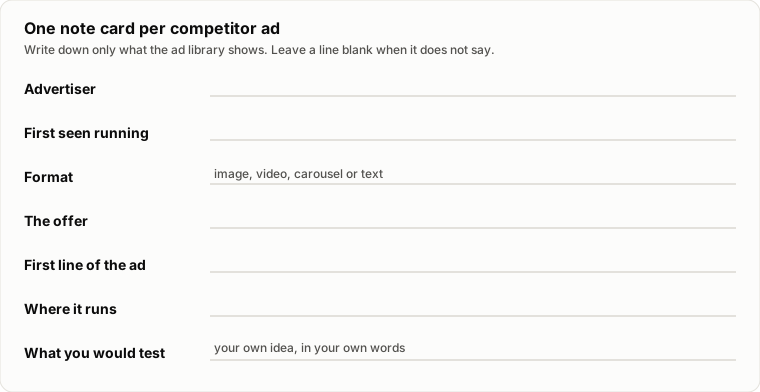
- Advertiser: the name or Page the library shows, plus the date you checked and the country you searched.
- First seen running: Meta's first-appeared date or LinkedIn's start date, and whether the ad is still active. The Google help pages we read describe when each ad last ran, not when it started, so note that instead.
- Format: image, video, carousel or text, as the library shows it.
- The offer: what the ad promises or prices, such as a discount, a free consultation or a bundle.
- First line of the ad: the opening words, copied exactly.
- Where it runs: the platforms the library lists, such as Facebook or Instagram on Meta.
- What you would test: your own idea, in your own words.
Keep the notes yourself. An ordinary Meta ad shown outside the EU leaves search once it stops. Your notes then become the only record of how long it ran.
Check the same three to five competitors, in the same countries, once a month. An offer they keep returning to is worth acting on. By our own estimate, not a measured figure, three competitors take about 30 minutes a month across the three libraries.
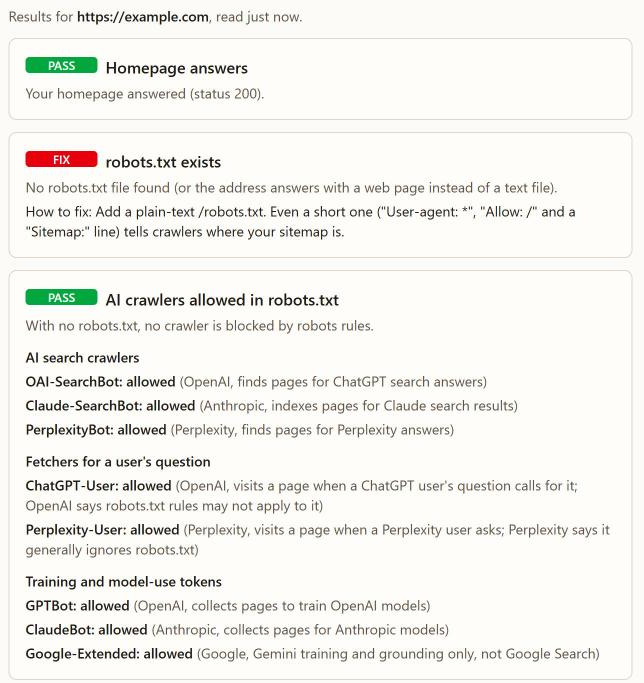
When a pattern earns a test, write it in your own words and judge it on inquiries and sales, using the weekly check in how to know if your marketing is actually working. Before you send ad clicks to your site, check the basics. Our free site check gives a pass or fail on robots.txt, AI crawler rules, sitemap.xml, the homepage title and meta description, and llms.txt, with no sign-up.
What are the common mistakes when studying competitors' ads?
The most common mistake with competitors' ads is treating the library as a scoreboard. The official pages we read do not say any library shows whether an ad worked. Apart from Meta's political and issue ads, they say nothing about what it cost. Five mistakes to avoid:
- Copying an ad. A copy borrows a promise built for someone else's product and price. Take the problem they lead with, then write your own words.
- Assuming a long-running ad is profitable. No page from the three libraries mentions clicks, leads or sales. A long run may mean the ad works, or that nobody has looked at the account in months. Treat it as an idea for a small test.
- Reading spend into ordinary ads. Meta shows spend ranges only for issue, election and political ads, and the Google and LinkedIn pages we read mention no spend.
- Searching one country only. Meta asks you to pick a country, and Google and LinkedIn filter by region or country. Search every market where you both sell.
- Forgetting everything that is not an ad. A rival's Google rankings, mentions in AI answers and ordinary unpaid posts are not ads, so check them on their own.
For the AI-answer side, how to get recommended by ChatGPT shows how to check who assistants name. In our own research, we asked ChatGPT 133 buyer questions. When our name was not in the question, it never named us. The free SEO audit shows how Google and AI search read your own site. Still deciding whether to advertise at all? Read Meta ads or SEO first.
When is checking competitors' ads the wrong hour to spend?
It is the wrong hour when you cannot act on what you find:
- Your own page is not ready for visitors. A rival's best ad is no use until you finish the page your ad would point to.
- You have no plan to test anything. The point of reading a rival's ads is one small test of your own. Without a test, the notes sit unused.
- Your buyers come through referrals or search, not ads. Spend the hour on the page they find in search, or on talking to them.
Where does Baljia fit?
Baljia, an AI employee for founders and small businesses that we make, does part of this job, for Meta ads only. Its competitor research shows your competitors' longest-running Meta ads and which of them AI answers recommend. It also shows the Google searches they win and changes to their pricing and home pages. Those findings feed your plan, and each weekly report includes what your competitors did.
The 83-second demo is an illustrated walkthrough; its page says the examples are not a live customer project.
The honest limits:
- Meta only for ads. The site does not say it tracks competitors' ads on LinkedIn, Google or TikTok, so search those libraries yourself.
- No spend or targeting claim. The site does not say it shows a rival's spend or targeting.
- LinkedIn is for outreach. Baljia's pages list competitor ad research for Meta only, and LinkedIn for outreach, which comes with the Growth and Scale plans only, not Starter or the free trial.
- No public reviews yet. Baljia has no public review profile yet, so judge it on your own task.
Plans start at $49.99 a month for Starter, at a launch price. Automations that run on their own start on a paid plan. To try Baljia on one real goal first, start the 7-day free trial, no credit card. The AI marketing agent page covers its other marketing work.
Frequently asked questions
Can I see how much my competitor spends on Facebook ads?
Not for ordinary ads, as far as the Meta help pages we read say. The Meta Ad Library lists spend ranges only for ads about social issues, elections or politics. For other ads you see the creative, the start date and where it ran.
Do I need an account, or to pay, to see competitors' ads?
For LinkedIn you need no account: its Ad Library says anyone can search it, with or without one. Meta's and Google's help pages do not say whether you must sign in. None of the official pages we read mentions a fee to search.
Can I see ads a competitor has stopped running?
Sometimes. LinkedIn keeps ads for one year after their last impression. Meta keeps stopped ads only if they reached the EU (one year) or are political or issue ads (seven years). The Google help pages we read do not say how long ads stay listed.
Can I see who my competitor's ads are targeting?
Only in some regions. LinkedIn shows targeting for ads aimed at the EU and Brazil. Meta's 2023 announcement described targeting for EU-delivered ads, and Google adds it for certain countries it does not name. Meta's political and issue ads also show the age, gender and location of the people who saw them. For other ads, the pages we read describe the ad, not its audience.
When is checking competitors' ads a waste of time?
Checking competitors' ads wastes time when your rivals do not advertise where these libraries reach. If every search comes back empty, finding people asking for your product is a better first step.
What happens after you start Baljia?
You tell Baljia your goal or give it your website, and it shows you a plan to approve before anything runs. Plan fees and credits are non-refundable. Cancelling does not delete your account or data.
Start with three competitors this month
Search your three closest competitors in all three libraries. Fill one card per ad. Next month, search again and mark what stopped. Gathering their longest-running Meta ads is part of Baljia's competitor research. To try Baljia on one real goal first, start the 7-day free trial, no credit card.
Sources
- https://m.facebook.com/help/259468828226154 (checked November 14, 2026)
- https://transparency.meta.com/researchtools/ad-library-tools/ (checked November 14, 2026)
- https://transparency.meta.com/policies/ad-standards/ (checked November 14, 2026)
- https://about.fb.com/news/2023/08/new-features-and-additional-transparency-measures-as-the-digital-services-act-comes-into-effect/ (checked November 14, 2026)
- https://support.google.com/My-Ad-Center-Help/answer/12155361?hl=en (checked November 14, 2026)
- https://support.google.com/adspolicy/answer/13733850?hl=en (checked November 14, 2026)
- https://support.google.com/adspolicy/answer/9703665?hl=en (checked November 14, 2026)
- https://blog.google/innovation-and-ai/technology/ads/announcing-the-launch-of-the-new-ads-transparency-center/ (checked November 14, 2026)
- https://www.linkedin.com/ad-library/home (checked November 14, 2026)
- https://www.linkedin.com/help/linkedin/answer/a1517918 (checked November 14, 2026)
- https://www.linkedin.com/help/linkedin/answer/a1620070 (checked November 14, 2026)
- https://baljia.ai/llms-full.txt (checked November 14, 2026)
Update log
- November 14, 2026: First published. Platform help pages checked the same day.
See Baljia in 83 seconds
An illustrated walkthrough with music; the examples in it are not a live customer project. See what each scene shows.