Market ·
How to Know If Your Marketing Is Actually Working
A 20-minute weekly check: Search Console impressions and clicks, Google Analytics sources, UTM tags and your own count of leads, meetings and sales.
By Digvijay Yadav, Founder, Baljia AI · LinkedIn
Baljia is an AI employee for founders and small businesses. It gets you found and books meetings. Try it on one real goal: a 7-day free trial, no credit card.
Start freeThe short answer
Your marketing is working when the numbers along a buyer's path rise together: people see you, visit, reply, meet you and buy. Check them once a week in about 20 minutes, by our own estimate: impressions and average position in Google Search Console, clicks and traffic sources in Search Console and Google Analytics, then your own count of leads, meetings and sales. The first number that stalls shows where to work next. This guide is for owners without a marketer.
Baljia is my company, and it reports each week on what moved, so it appears in one short section near the end. We read Google's help pages on November 14, 2026, and each definition below links to its source. We did not log in to any account to write this.
Key takeaways
- Follow the buyer's path in order: seen, visited, replied, met, bought. Note one number per stage each week and work on the first that stops growing.
- In Google Search Console, an impression counts how often someone saw a link to your site on Google, and a click counts how often someone clicked a link from Google through to your site. The newest data is preliminary and can lag by hours to a couple of days, so judge a week that has settled.
- Google Analytics shows where each visit came from under Reports > Acquisition > Traffic acquisition. A key event is an action you mark as important, and marking one changes reports only from that moment on.
- Tag every link you share with utm_source, utm_medium and utm_campaign, the three Google says to always use. Any you leave out show as (not set) in reports.
- Baljia, which we make, reports each week what moved, what your competitors did and next week's plan; its site does not list which numbers that report contains. Its 7-day free trial, no credit card is a way to try Baljia on one real goal.
What should you measure to know if marketing works?
To know if marketing works, measure one number at each step a buyer takes, in order. The chain shows where buyers drop off:
- Seen. You show up where buyers look. On Google: Search Console impressions and average position.
- Visited. Someone clicks through. Search Console clicks and Google Analytics traffic sources.
- Replied or became a lead. An email reply, a form, a booking request, a message. You count these; Analytics can count the ones on your site as key events.
- Met. A call or meeting with a possible buyer. You count these.
- Bought. A sale. You count these.
The last two numbers matter most, and unless you sell online, neither Search Console nor Analytics sees them. That is why you count half of the scorecard below by hand.
How do you check whether people are seeing you on Google?
You check whether people see you on Google in the Search Console Performance report for Search results. Set its Date filter to the same seven days each week and note two numbers:
- Impressions: how often someone saw a link to your site on Google. A link usually counts once it is on the results page the person is viewing, even if they never scroll to it, so an impression is not a read (Google's definitions).
- Average position: a relative ranking where 1 is the top. For each query, Search Console takes your highest position, then averages across queries; Google's own example averages a 2 and a 3 into 2.5. Google warns the figure can mislead and suggests watching how it changes over time.
How fresh the data is. The newest data is preliminary, drawn as a dotted line, and may still change over the next few hours (Performance report help). Google's guide to using Search Console with Analytics adds that data can lag by a couple of days (source). So record the seven days that ended two or three days ago.
How far back it goes. The Date filter offers the last 16 months (source), so you can fill the Search Console rows for last week and four weeks ago on day one.
Use the chart totals. The chart counts two of your results on one search as one impression, while the table's Pages view counts each page, so totals can differ.
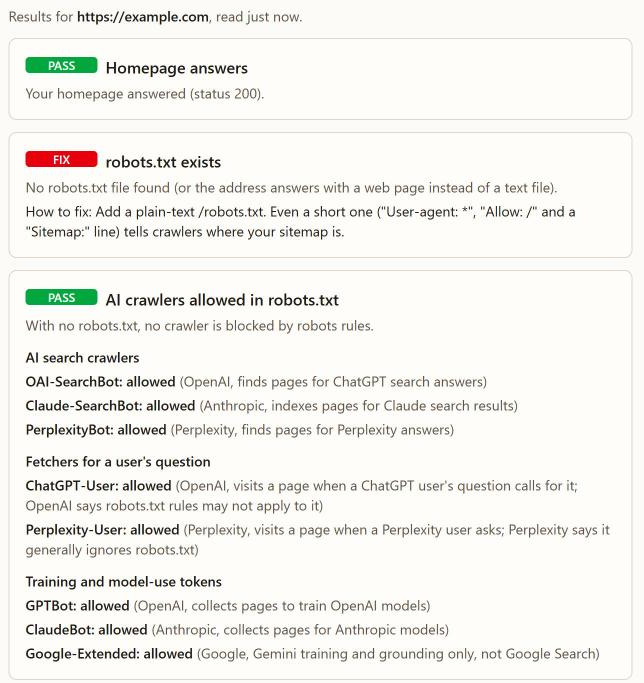
If impressions sit near zero, first make sure Google can read the site. Our free site check gives a pass or fail on robots.txt, AI crawler rules, sitemap.xml, the homepage title and meta description, and llms.txt, with no sign-up. If you are publishing to raise impressions, whether AI-written content ranks on Google depends on how useful each page is.
How do you know if people are visiting your site?
You know people are visiting your site from two reports: Search Console clicks for visits from Google, and the Google Analytics Traffic acquisition report for visits from everywhere.
- Clicks (Search Console): how often someone clicked from Google through to your site; a click that stays inside Google does not count. Clicking a result, coming back and clicking it again counts once. Clicks divided by impressions is your click-through rate (CTR) (source).
- Traffic acquisition (Analytics): open Reports > Acquisition > Traffic acquisition. By default it groups sessions into channels such as Direct, Organic Search, Paid Social, Organic Social and Email, and you can switch to source, medium or campaign. Write down sessions per channel (source).
Do not expect the two to match. Google says the tools calculate them differently: Search Console covers what happens on Google before the visit, Analytics what visitors do on your site (source).
Leave the User acquisition report aside: it counts users by where they first came from, and Google warns against comparing the same metric across the two reports (source).
How do you tag links so you know which ones worked?
You tag links with UTM parameters: short labels added to the end of a URL that tell Google Analytics which source, medium and campaign sent a visit (Google's help page). Google notes that traffic-source data depends on tagged links or on ad platform integrations and auto-tagging (source). The parameters Google lists:
- utm_source: who sent the visit, such as a newsletter.
- utm_medium: the kind of channel, such as email, cpc or banner.
- utm_campaign: the product, slogan or promo code.
- utm_id: an ID for one campaign or promotion.
- utm_source_platform: the platform directing the traffic.
- utm_term: the paid keyword.
- utm_content: tells apart two creatives, or two links in one email.
- utm_creative_format and utm_marketing_tactic: listed too, but not currently reported in Analytics.
Google says always use utm_source, utm_medium and utm_campaign, and strongly recommends adding utm_id and utm_source_platform whenever you set any. Parameters you leave out show as (not set).
A worked example. You post a winter offer on your Facebook Page with a link to your booking page. The tagged link:
https://www.example.com/book?utm_source=facebook&utm_medium=social&utm_campaign=winter_offer&utm_id=winter01
utm_source=facebook: the visit came from Facebook.utm_medium=social: from a post, not an ad; give the ad version its own label, such as cpc.utm_campaign=winter_offer: groups every link for this offer, including the email version.utm_id=winter01: the campaign ID Google recommends. Google also strongly recommends utm_source_platform whenever you tag a link; its examples are ad platforms such as Search Ads 360.
To see these visits, switch Traffic acquisition to Session campaign or Session source / medium. Google's campaign URL builder assembles links for you. Reuse one spelling per label so your report rows line up.
How do you count leads, meetings and sales?
You count leads, meetings and sales yourself, because most of them happen in your inbox, calendar and sales records rather than on your website. Each week, count:
- Replies and leads: email replies, form fills, booking requests and messages that ask about buying. Count outreach replies apart from people who came to you; cold email that stays out of spam covers the sending side.
- Meetings: calls or visits booked with a possible buyer.
- Sales: new paying customers.
Ask each new lead how they found you and note it; that fills gaps no tag covers.
Where something happens on your site, Analytics can count it as a key event: an action you mark as especially important to your business's success (source). To mark one (Google's steps):
- In Admin, under Data display, click Events.
- Find the event in the Recent events tab, or search for it.
- Click the star next to it.
If the action is not in the list yet, Google's page says you can create a new event and mark it at once with the Mark as key event toggle (Marketer role or above).
Marking the star needs the Editor role or above, and a standard property allows up to 30 key events. Marking changes reports from that point on, not past data, and standard reports can take up to 24 hours to show it. Analytics marks purchase by default.
What does a weekly marketing scorecard look like?
A weekly marketing scorecard is one row per number, filled in on the same day each week, with earlier weeks beside it. Copy this into a spreadsheet:
| Stage | Number | Where to find it | This week | Last week | Four weeks ago |
|---|---|---|---|---|---|
| Seen | Impressions | Search Console, Performance, chart total | |||
| Seen | Average position | Search Console, Performance, chart | |||
| Visited | Clicks from Google | Search Console, Performance, chart total | |||
| Visited | Sessions by channel | Analytics, Traffic acquisition | |||
| Lead | Key events, if set up | Analytics, Traffic acquisition | |||
| Lead | Replies and leads | Your inbox, forms and messages | |||
| Met | Meetings booked | Your calendar | |||
| Bought | New customers | Your sales records |
This assumes your site is already in Search Console and Google Analytics; in the first week, building the sheet, tagging links and marking key events take longer. After that, our own estimate is 20 minutes a week, in this order:
- Search Console, 5 minutes: impressions, average position and clicks for the settled week.
- Analytics, 5 minutes: sessions by channel and key events, then the Session campaign view for tagged links.
- Your own count, 5 minutes: inbox, calendar, sales.
- One decision, 5 minutes: find the first stage that fell against four weeks ago and write one change for next week.
How do you decide which number to fix first?
Decide which number to fix first by reading the scorecard from the top. Small numbers jump around, so compare with four weeks ago, not last week. Then stop at the first question you answer yes to:
- Are impressions flat or falling? Work on showing up: a site Google can read, and pages that answer buyer questions.
- Are impressions rising but clicks flat? Work on what people see in the results.
- Are visits rising but leads flat? Work on the page or the offer.
- Are leads coming in but meetings not? Work on your follow-up.
- Are meetings happening but sales not? Work on the conversation or the price.
Change one thing at a time, then give it a few weeks before you judge it.
What can these numbers not tell you?
These numbers cannot tell you why a buyer acted, and some are incomplete by design:
- Some searches are missing. Search Console omits some queries to protect privacy and stores only the most important rows, so its query table never lists everything (source).
- Search Console covers Google only. Whether ChatGPT or Perplexity names you needs a separate check; how to get recommended by ChatGPT shows one. In our own research, we asked ChatGPT 133 buyer questions. When our name was not in the question, it never named us.
- A rise is not proof of cause. A season or a rival's new campaign can move numbers too; how to see your competitors' ads covers the second.
- No number explains a no. Ask the people who did not buy.
How long before marketing shows up in the numbers?
How long marketing takes to show up depends on the channel, and Google gives no fixed timeline for search. Its SEO starter guide says: "Some changes might take effect in a few hours, others could take several months." The same section suggests waiting a few weeks before judging whether a change helped (SEO starter guide).
Two rules follow:
- Judge search work on the four-week trend, and keep going while impressions rise, even before clicks follow.
- Judge ads and outreach on the weeks they run. Meta ads or SEO first covers that trade.
If someone promises a ranking date, ask how they know. Google's Do you need an SEO? page suggests asking what results they expect and in what timeframe.
When is this weekly check the wrong use of an hour?
The weekly check is the wrong use of an hour in three cases:
- You have almost no visitors or leads yet. With a handful a week, the numbers mostly jump around. Spend the hour finding and talking to buyers; first customers with AI covers that stage.
- You want to check every day. The newest Search Console data is preliminary and can still change, so daily looks mostly show noise.
- You want more numbers. Eight rows already give you one decision a week. Add a row only when a decision depends on it.
Where does Baljia fit?
Baljia, an AI employee for founders and small businesses that we make, reports each week what moved, what your competitors did and next week's plan, and remembers your decisions so each week's results shape the next plan. The 83-second demo is an illustrated walkthrough; its page says the examples are not a live customer project.
The honest limit: its site does not say which numbers that report contains, or that it reads your Search Console or Google Analytics. Keep this scorecard either way; it works whether or not you use Baljia. Baljia reports receipts, such as a live URL or a booked lead, never a promise of revenue, and its ad work covers Meta only.
For a first look at your own site, the free SEO audit checks a URL for Google and AI search. Plans start at $49.99 a month for Starter, at a launch price, and automations that run on their own start on a paid plan. To try Baljia on one real goal first, start the 7-day free trial, no credit card; the AI marketing agent page covers the rest.
Frequently asked questions
How much does it cost to check if my marketing is working?
The routine itself costs about 20 minutes a week, by our own estimate, and a spreadsheet. Check Google Search Console's and Google Analytics' pricing on Google's own pages; the help pages we read do not cover it. A paid dashboard saves copying but does not replace counting leads, meetings and sales by hand.
What is a good average position or click-through rate?
The Google pages we read give no benchmark, so compare each figure with your own past weeks. Google itself warns that average position can mislead.
Who is this weekly scorecard not enough for?
It is not enough for a business running many paid campaigns at once, which needs the ad platforms' own reports more often than weekly. A business with no website can still use the bottom half.
What should I do after a bad week?
Check that the week has settled, since the newest Search Console data is preliminary. If a stage has truly fallen against four weeks ago, change one thing there and leave the rest alone.
What happens after you start Baljia?
You tell Baljia your goal or give it your website, and it shows you a plan to approve before anything runs. Plan fees and credits are non-refundable. Cancelling does not delete your account or data.
Fill in your first scorecard this week
Copy the table, fill in this week and leave the other columns for later; after four weeks you will see which stage stalls. To try Baljia on one real goal before you choose a plan, start the 7-day free trial, no credit card.
Sources
- https://support.google.com/webmasters/answer/7042828 (checked November 14, 2026)
- https://support.google.com/webmasters/answer/7576553 (checked November 14, 2026)
- https://developers.google.com/search/docs/monitor-debug/google-analytics-search-console (checked November 14, 2026)
- https://developers.google.com/search/docs/monitor-debug/debugging-search-traffic-drops (checked November 14, 2026)
- https://support.google.com/webmasters/answer/17011259?hl=en (checked November 14, 2026)
- https://support.google.com/analytics/answer/12923437?hl=en&co=GENIE.Platform%3DDesktop (checked November 14, 2026)
- https://support.google.com/analytics/answer/14731736?hl=en (checked November 14, 2026)
- https://support.google.com/analytics/answer/10917952?hl=en (checked November 14, 2026)
- https://support.google.com/analytics/answer/9355848?hl=en (checked November 14, 2026)
- https://support.google.com/analytics/answer/13128484?hl=en (checked November 14, 2026)
- https://developers.google.com/search/docs/fundamentals/seo-starter-guide (checked November 14, 2026)
- https://developers.google.com/search/docs/fundamentals/do-i-need-seo (checked November 14, 2026)
- https://baljia.ai/llms-full.txt (checked November 14, 2026)
Update log
- November 14, 2026: First published. Google help pages checked the same day.
See Baljia in 83 seconds
An illustrated walkthrough with music; the examples in it are not a live customer project. See what each scene shows.