Sell ·
How to Get Customers from LinkedIn: a Founder's Guide
Customers come from conversations, not blasts: a small hand-picked list, a problem-first message, follow-ups that stop on reply, measured on meetings.
By Digvijay Yadav, Founder, Baljia AI
The short answer
Customers on LinkedIn come from conversations, not from volume. The founders who win clients there run a small weekly system: a hand-picked list of people who plausibly have the problem, a first message about that problem instead of a pitch, a few short follow-ups that stop the moment anyone replies, and a scoreboard that counts meetings rather than messages sent.
That system fits in about 30 minutes a day. You do not need a sales team, a paid tool or Sales Navigator to start. You need a reason to talk to each person on your list, and the discipline to measure the right thing.
This guide covers the whole loop: who to pick, what to send, when to follow up, what LinkedIn's rules actually say, and how to tell whether it is working. We make Baljia, which includes LinkedIn outreach on the Growth and Scale plans, so read the product section near the end with that in mind. Every claim about LinkedIn's rules below cites LinkedIn's own pages.
Start with 20 people and no budget
Most LinkedIn sales advice assumes you will buy software or a Sales Navigator seat on day one. Skip both. The first version of this system is a spreadsheet and the search box every free account already has.
Pick 20 people, by hand. Search for the job title that owns your problem, narrow by industry or city if that gets you closer to real buyers, and open profiles until 20 of them fit. For each one, add a row with five columns: name, profile link, company, one sentence that says why they are relevant, and a link to the evidence behind that sentence.
That one sentence is the whole filter. It reads like: "They run a six-person accounting firm and are hiring an office manager, which usually means scheduling is breaking." If you cannot finish the sentence without inventing something, do not delete the row. Park it in a third bucket called "needs research" and move on. A list where every row carries an honest sentence beats a list ten times longer where none does.
Then work the list for 30 minutes a day: ten minutes adding and researching rows, ten minutes sending first messages and answering replies, ten minutes being useful in the places your buyers read.
Ten people from one segment are enough to learn whether the segment is real. If none of ten owners of the same problem even recognizes the problem in your message, the message is not the issue. The segment is. Pick a different 20 and keep the spreadsheet; the dead rows teach you what to stop looking for. If you cannot yet name one real buyer, run the one-day exercise for finding people asking for your product first.
Where to find people worth 20 minutes
A name belongs on your list when something observable connects it to your problem. Six places produce that reliably.
People asking about the problem. Search LinkedIn posts for the words a buyer would use, then read the comments. Small posts count as much as viral ones; the person asking a specific question in a comment is closer to buying than the person publishing think pieces.
Commenters on competitor posts. Under a competitor's feature announcements, three kinds of comment are gold: questions about whether it works with something else, complaints about a limit, and descriptions of a workaround. Answer the question they actually asked, in private, after connecting. Never pitch inside the competitor's thread. Research in public, talk in private.
People who engaged with your own posts. A like or a comment on your post about the problem is declared interest. Filter by title before messaging anyone; students, peers and bots engage too.
Hiring signals. A job posting is budget, a deadline and a named owner of the problem, all in public. Search LinkedIn Jobs for roles that imply your problem. Pick the title companies actually post, not the impressive one: the everyday operational role usually has far more postings than the glamorous strategic one, and its manager is the one who feels the pain this quarter. Check the counts in LinkedIn Jobs yourself before committing to a title.
Your own waitlist and quiet trial users. People who signed up and went silent already raised a hand once. Match the signup email to a LinkedIn profile; when you cannot match with confidence, skip the person rather than guess. The first message is one friendly question: what made you sign up, or did something get in the way.
Second-degree connections. Filter search results to second-degree and name the mutual connection in your message. A shared name is the cheapest honest proof you have.
Whatever the source, the rule holds: one row per person, the "relevant because" sentence filled in, the evidence linked. A source that keeps producing rows you cannot finish sentences for is a source to drop.
The first message: three rules
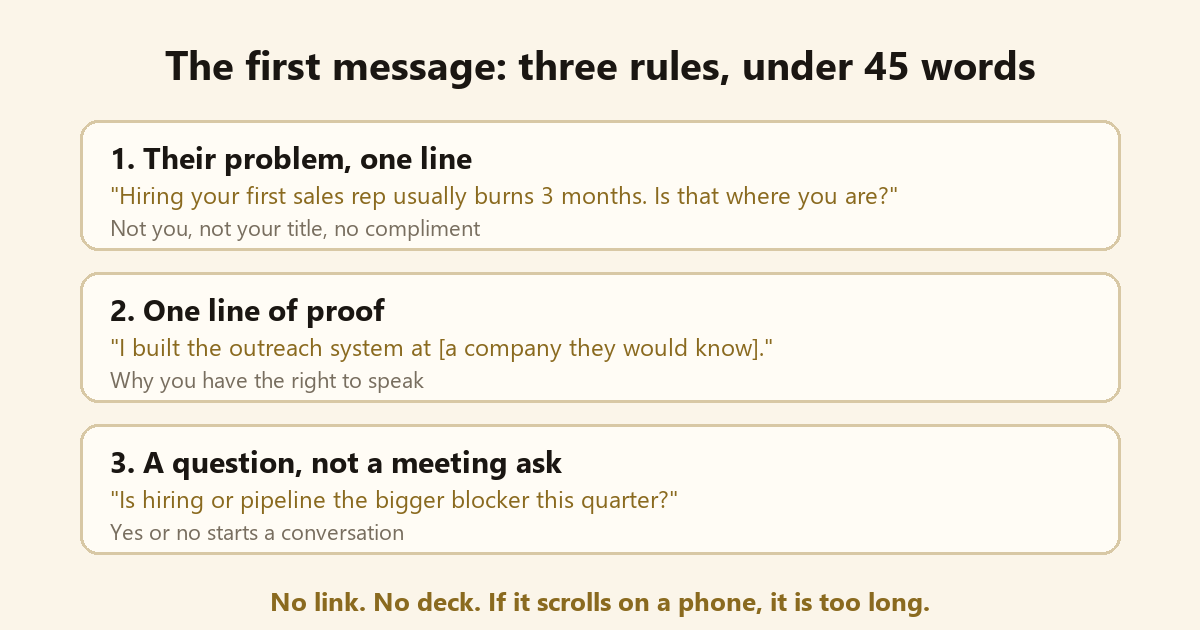
The message text and figures in this diagram are invented example wording, not a script to copy or a statistic.
Rule one: open with their problem, not with you. The test is simple: by the end of the first line, the reader should already have a yes or a no forming. "Are you still reconciling bookings across three calendars by hand?" passes. "I'm the founder of a scheduling startup" fails, because there is nothing to answer.
Rule two: add one line of proof you have earned. A customer they would recognize, the job you held last, a number from your own work. Without it, the note is a stranger's pitch. With it, it reads like a peer asking a fair question.
Rule three: end with a question about the problem, never a meeting ask. Either answer, yes or no, opens a conversation you can work with. A calendar link in message one mostly opens nothing.
Keep the whole thing under 45 words, three short lines, no link, no attachment. If it fills a phone screen, cut it. And personalize the business reason, not the biography: a line about something you noticed at their company lands, while a compliment about their career history reads as pasted. To check a draft against these rules before you send it, paste it into our free LinkedIn first message checker, which runs in your browser.
The connection request itself stays bare. LinkedIn's Professional Community Policies tell members not to use invitations to send promotional messages to people they do not know. Free accounts also get only a handful of personalized invites each month; LinkedIn's help pages say three per month on the newer page and five on an older one, so plan for three. Both facts point the same way: the request earns the right to talk, and the message after acceptance does the talking.
Follow-ups: four touches, one job each
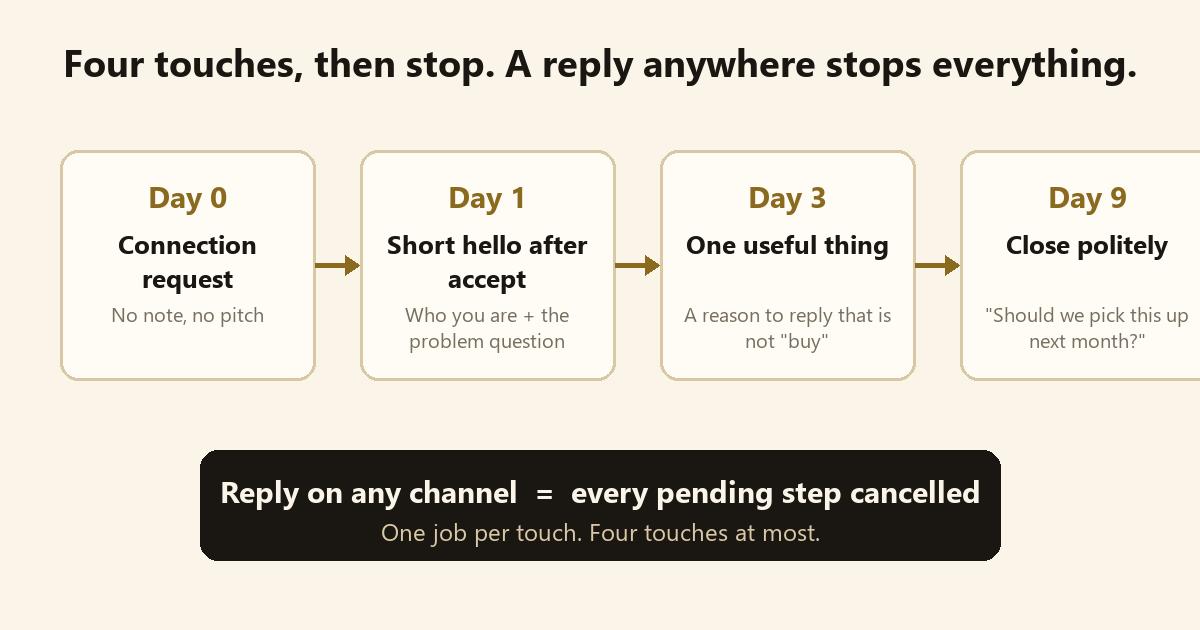
The diagram runs day 0, 1, 3 and 9, and its follow-up wording is example wording; write each touch in your own voice.
A follow-up is not a second delivery of the pitch. Each touch has exactly one job, and when two touches carry the same pitch, you delete one.
| Touch | When | Its one job |
|---|---|---|
| Connection request | Day 0 | Get accepted, nothing else |
| First message | Day 1, once accepted | Get a yes or no on the problem |
| One useful thing | Day 3, only if silent | Hand over something helpful with no pitch attached |
| Polite close | Day 9 | End well and leave the door open |
The days assume a quick acceptance; when a request sits unanswered, the clock starts once it is accepted. Stop after four touches. Most outbound playbooks stop there, and past that point you are mostly annoying the exact people you picked because they fit.
One person, one sequence, across every channel. If you run email alongside LinkedIn, a reply anywhere cancels everything pending everywhere. Few things burn trust faster than a cheerful LinkedIn nudge the day after someone answered your email.
Replies land in about five branches, each with one right move:
| They say | You do |
|---|---|
| "Not now" | Ask when it becomes a priority, and write that date down |
| "We already use X" | Ask what X still does not solve for them |
| "Send me some info" | Send one page written for them, never a generic deck |
| "Talk to my colleague" | Ask for the warm intro instead of cold-messaging the colleague |
| Anything with meeting intent | Send the booking link immediately, while the intent is live |
Before handing any of this to software, read every draft the way our checklist for reviewing AI-written sales messages lays out.
The rules and the risk, straight
LinkedIn's User Agreement, effective November 3, 2025, says in section 8.2 that members agree not to use bots or unauthorized automated methods of any kind, whether to access the service, add contacts, send messages, or create, comment on, like or share posts, not to use software that scrapes the service, and not to bypass its access controls or use limits. Read that list once and you have read the sales page of many LinkedIn automation tools in reverse: automated connection requests, automated messages, automated profile views and likes sold as "warm-up", automated comments, scraped lists. Each one is named or covered by the same line.
On March 13, 2026, LinkedIn's newsroom added that it actively limits the reach of engagement pods and automated comments, defined an automated comment as one posted by a tool rather than a person clicking the button, and warned of account restrictions.
Now the folklore. You will read everywhere that LinkedIn allows around 200 connection requests a week. LinkedIn publishes no weekly number, anywhere. Its help page says that every account has invitation limits, that hitting one typically restricts invites for one week, and that withdrawing pending invites does not lift the restriction. Treat any precise cap you read, including in vendor marketing, as a community guess about an unpublished number that can change.
So where is the line? The plainest honest version: the automation that adds the least account risk is automation that stops at the draft. Tools that only draft, and schedule through official routes, sit in the lowest-risk lane. Software that researches and writes while you click send yourself, without scraping LinkedIn or acting through your account, keeps you the author of every action. List-building by scraping sits outside the rules whoever presses the send button, because section 8.2 bans the scraping software itself. And software that sends from your account is automation under 8.2 whatever its pacing settings say; pacing reduces volume, it does not grant permission. The wider question, including email law and your reputation, is the subject of Is it safe to let AI send messages in your name?, and this guide will not re-argue it.
That is also the position we publish about our own product: sending limits reduce volume; they do not guarantee account safety or platform permission, and LinkedIn can restrict accounts that use automation.
Measure meetings, not messages
Count unique people, never messages. Forty messages to ten people is ten people. Each week, record three numbers: people who accepted, people who replied on any channel, meetings booked.
Judge the system on meetings. A witty message that collects polite replies and no meetings is entertainment, not sales. When you test a change, change the list or the message, never both in the same week, or you will not know which one moved the numbers.
Work backwards from the goal. Decide how many customers you want this quarter, estimate how many meetings one customer takes, and you have your meetings target; the reply and acceptance rates you observe then tell you how long the weekly list must be. If the arithmetic demands more people than you can honestly pick by hand, that is a finding too: improve the ratios before you chase volume.
Read replies as data, not verdicts. "Not my department" says your targeting is one role off. "We already use X" says the problem exists but you arrived late or positioned against the wrong gap. "How is this different from X" says a qualified buyer is evaluating. Silence across a whole segment indicts the segment, not the sentence.
Where Baljia fits
Everything above runs fine by hand, and by hand is how you should prove your first segment. The ceiling is your time.
Baljia is an AI employee for founders and small businesses that gets you found and books meetings. On the selling side it finds the people who need you, starts conversations on LinkedIn and email, drafts follow-ups and books meetings to your calendar, keeping a simple pipeline. It paces follow-ups and stops when someone replies. Everything stays a draft until you approve it or switch sending on. LinkedIn campaigns come with the Growth and Scale plans; Starter and the free trial do not include LinkedIn. And the caution above applies to us as much as to anyone: sending limits reduce volume; they do not guarantee account safety or platform permission. LinkedIn can restrict accounts that use automation, including accounts connected to Baljia, so the lowest-risk way to use it on LinkedIn is to keep messages as drafts and send them yourself. The AI sales outreach page covers costs, account risks and limits, and pricing lists the plans.
Frequently asked questions
How many connection requests a week is safe on LinkedIn?
There is no published safe number. LinkedIn confirms that invitation limits exist and that hitting one typically restricts inviting for one week, but it states no weekly figure; numbers like "200 a week" are community folklore. Under this guide's system the question fades: a hand-picked list sized from your own goal, as in the measuring section above, stays far below any limit people speculate about.
Should I add a note to a connection request?
Keep the request bare, or nearly so. LinkedIn's Professional Community Policies prohibit using invitations to pitch strangers, and free accounts get about three personalized invites a month anyway. Put your words in the first message after acceptance instead.
Do I need Sales Navigator to get customers from LinkedIn?
No, not to start. Free search plus a hand-built 20-person list is enough to prove whether a segment answers. Sales Navigator adds filters and volume once a segment already works; it does not supply the reason-to-talk that makes a message land.
How long does it take to get a customer from LinkedIn?
Expect conversations within weeks and customers on your market's normal sales cycle. No honest number exists beyond that: a $50 product and a $50,000 service close on different clocks. Judge the list on replies after two weeks, the system on meetings after a month, and revenue on the cycle your buyers already have.
What should I do when nobody replies?
Treat silence as data about the list before blaming the message. If ten people from one segment show no recognition of the problem, change the segment. If replies say "not my department", shift the role you target. Change the list or the message between weeks, never both at once.
Start with the drafted version
The lowest-risk way to try any of this with AI is to let it draft while you click send. Baljia offers a 7-day free trial, no credit card, at https://baljia.ai/. The trial does not include LinkedIn campaigns, which come with Growth and Scale, but it will show you how the drafting and approval loop feels before you commit to anything.
Sources
- https://www.linkedin.com/legal/user-agreement (checked November 5, 2026)
- https://www.linkedin.com/legal/professional-community-policies (checked November 5, 2026)
- https://news.linkedin.com/2026/authentic-content-and-conversations (checked November 5, 2026)
- https://www.linkedin.com/help/linkedin/answer/a550555 (checked November 5, 2026)
- https://www.linkedin.com/help/linkedin/answer/a563153 (checked November 5, 2026)
- https://baljia.ai/llms-full.txt (checked November 5, 2026)